Your logo in supported inboxes. One DNS record to manage.
Upload your logo. EasyDMARC validates and hosts the assets, manages the BIMI record, guides the certificate steps, and keeps the setup current. You publish one CNAME. BIMI Reporting shows where the logo is observed after launch.
- One CNAME to publish in DNS
- Managed updates without replacing the CNAME
- Logo and certificate assets hosted and validated by EasyDMARC
No credit card required
90,000+ organizations trust EasyDMARC worldwide
Check your BIMI record
Available in Premium and Enterprise plans
BIMI deployment has four parts to get right.
Mailbox providers make the final display decision. These are the technical pieces you need in place first.
DMARC at enforcement
BIMI requires DMARC enforcement on the organizational domain and applicable subdomains. p=none and pct values below 100 are not accepted.
A BIMI-compliant SVG logo
The logo must use the SVG Tiny Portable/Secure profile with baseProfile="tiny-ps" and version="1.2". Standard SVG exports often need additional cleanup.
A BIMI record and hosted assets
The BIMI record references the logo and, when used, a mark certificate at HTTPS locations. Managed BIMI delegates this through one CNAME in your DNS.
A mark certificate where required
Some providers support self-asserted BIMI. Gmail requires a VMC or CMC. A VMC is based on an eligible registered trademark, while a CMC follows different certificate eligibility rules.
From setup to updates, one managed process.
You provide the assets and publish one CNAME. EasyDMARC handles the technical BIMI work around it.

What your team needs to do
- Provide your BIMI logo and mark certificate when required.
- Publish the CNAME EasyDMARC gives you.
- Verify propagation in EasyDMARC.

We handle the BIMI work behind the CNAME
- Validate the logo against SVG Tiny P/S requirements.
- Host the logo and certificate assets at stable HTTPS locations.
- Generate and manage the BIMI record behind your CNAME.
- Validate the active record and deployment status.
- Apply managed asset and record updates without replacing your CNAME.
- Guide certificate and DMARC-readiness steps when they are needed.
Manage BIMI across domains from one dashboard.
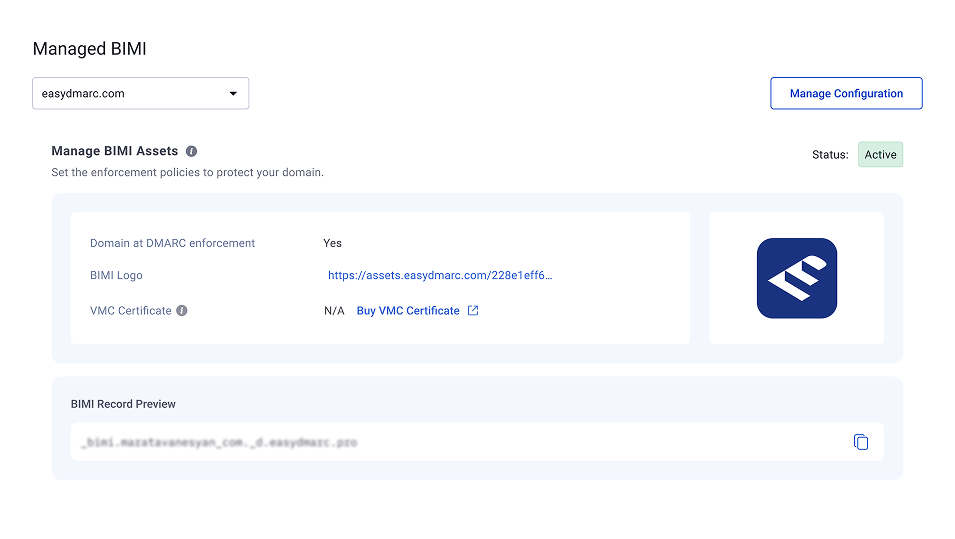
Your logo file, VMC, active DNS record, and avatar preference are managed through one hosted BIMI dashboard. Update managed assets without editing DNS.
Deploy BIMI. Then see where your logo appears.
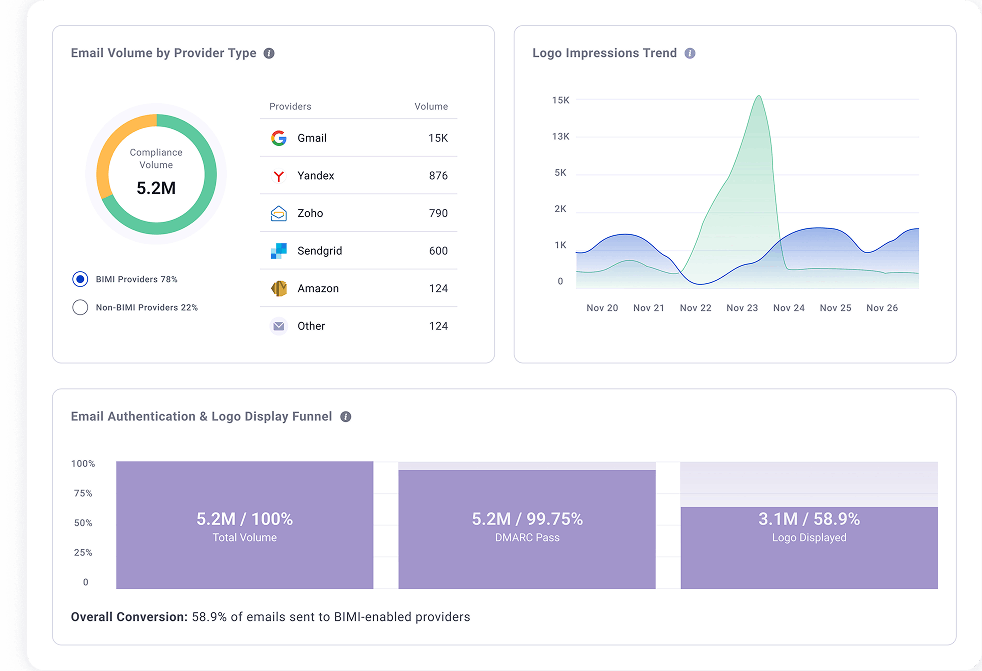
BIMI Reporting shows observed logo displays by mailbox provider, so you can measure coverage and investigate gaps.
What you can see after deployment
- Brand impressions for observed logo displays over time.
- Provider coverage across Gmail, Yahoo, Apple Mail, and Fastmail.
- Authentication-to-logo funnel to pinpoint where eligible mail loses logo display.
- Change impact before and after DNS, asset, or certificate updates.

Mark certificate issuance is handled by an external Certificate Authority. EasyDMARC helps you understand which certificate (VMC or CMC) is needed and coordinates the next steps with the appropriate provider.
Get help with a certificateA managed process that is easy to follow.
Common questions about Managed BIMI
Have more questions?
Ask via Live Chat or Contact Us
What is Managed BIMI, and how does it work?
Managed BIMI helps you set up and manage the brand logo that appears beside your emails in supported inboxes. With EasyDMARC, you upload your BIMI-compatible logo and add the generated CNAME record to your DNS. EasyDMARC hosts the logo and lets you manage your BIMI configuration through its platform.
What do I need to set up BIMI for my domain?
You need a logo in SVG Tiny PS format, a DMARC policy set to p=quarantine or p=reject, and a correctly configured BIMI record. Your enforcement policy must apply to all messages. You may also need a logo certificate, depending on the mailbox providers you want to reach.
Do I need a VMC to display my logo in Gmail?
Gmail accepts either a Verified Mark Certificate (VMC) or a Common Mark Certificate (CMC) for BIMI. A VMC also enables Gmail’s verified sender checkmark; a CMC allows an eligible logo to appear without that checkmark.
Does my logo need to be trademarked to use BIMI?
A registered trademark is generally required for a VMC. If your logo is not trademarked, a CMC may be an option, provided it meets the certificate issuer’s requirements. The right choice depends on your logo and the mailbox providers you want to support.
Can I use BIMI if my DMARC policy is set to “none”?
No. BIMI requires an enforcement policy of p=quarantine or p=reject. A monitoring-only policy of p=none does not qualify. Before moving to enforcement, check that your legitimate email services pass DMARC so their messages are not unexpectedly quarantined or rejected.
Do I need to host my BIMI logo on my own server?
No. EasyDMARC hosts your logo and maintains the hosting infrastructure as part of Managed BIMI. You still need access to your domain’s DNS to publish the CNAME record during setup.
Can I update my BIMI logo without changing my DNS record?
Yes. Once the Managed BIMI CNAME record is in place, you can manage subsequent BIMI updates through EasyDMARC. If you change a certified logo, you may also need an updated certificate that covers the replacement logo.
Can I use Managed BIMI with my current DNS provider?
You can use Managed BIMI if your DNS provider allows you to publish the required CNAME record. Your website and email hosting can remain with your existing providers. The initial setup requires access to your DNS settings.
Will BIMI make my logo appear in every inbox?
No. Your logo can appear only in inboxes that support BIMI, and each mailbox provider applies its own display requirements. A valid BIMI setup makes your domain eligible, but it does not guarantee that every recipient will see your logo.
Why is my BIMI logo not showing after setup?
Check your DMARC enforcement policy, BIMI record, logo format, and certificate validity. Your hosted files must also be publicly accessible over HTTPS. If those checks pass, the mailbox provider may still be processing the change or applying its own eligibility rules.