Free Email Deliverability Test
Across Major Providers
Run an email deliverability test to see if your emails land in
Inbox, Spam, or Promotions across major providers.
Email Deliverability Test
Step 1: Use Copy email addresses to add recipients
Step 2: Insert the displayed code into your email body
Check If Your Emails Reach the Inbox
Inbox placement determines whether your audience actually sees your message. If emails land in spam or low visibility tabs, engagement drops before performance metrics even begin to matter.
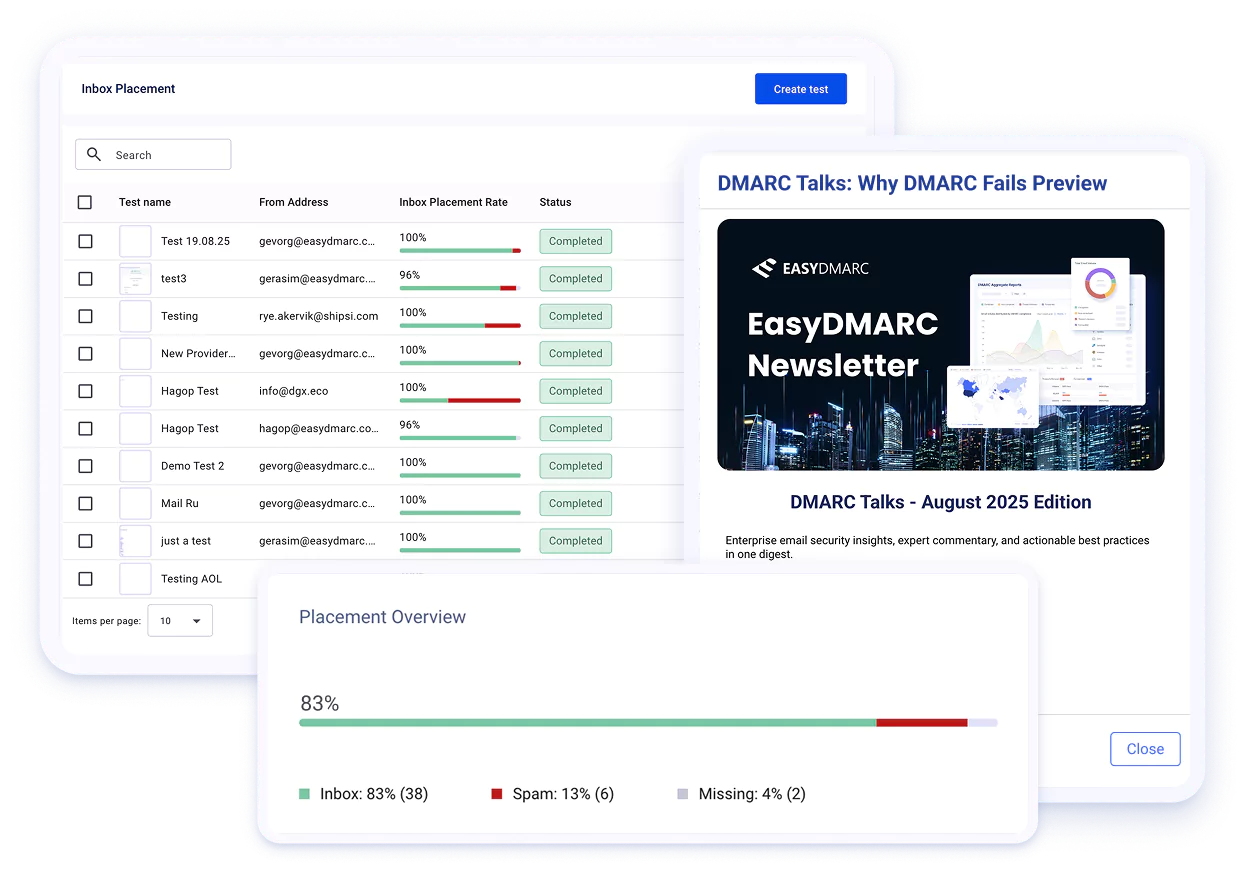
- See inbox, spam, and promotions placement
- View your inbox placement rate across major providers
- Check Gmail tab categorization, time to receive, and sender IP
- Run the test directly from your ESP
EasyDMARC uses a global network of real inboxes across major providers and ISPs, so results reflect actual mailbox behavior, not simulations.
Improve Deliverability Long Term
A single test shows where your emails land. Improving inbox placement requires continuous authentication and reputation management.
- Manage DMARC, SPF, and DKIM in one place
- Monitor domain reputation over time
- Enforce policies with confidence
- Protect your domain from spoofing
Monitor and improve inbox placement continuously.

Why Inbox Placement Tests Matter
Open rates and delivery stats do not show where your email actually lands. Inbox placement determines whether your message is seen or filtered before it has a chance to perform.
See real folder placement
Even if your ESP reports “Delivered,” that does not guarantee inbox placement. An inbox test shows whether Gmail, Outlook, Yahoo, or other providers route your message to Inbox, Spam, or Promotions before you send at scale.
Spot issues early
Unexpected spam placement can point to issues with authentication, domain reputation, or email content. An email spam test gives you an early warning so you can take action before performance drops.
Compare providers
Each mailbox provider applies different filtering logic. A message delivered to Gmail's Primary tab may land in Outlook's spam folder. Placement tests make those differences clear.
Protect engagement
When emails are filtered out of the inbox, engagement drops. Strong placement improves visibility, consistency, and overall performance.
How EasyDMARC's Email Deliverability Checker Works
Step 1: Add the test email addresses
Copy the provided inbox addresses and paste them into your recipient field.
Step 2: Insert your unique code
Place the generated code inside your email body so the system can track the message.
Step 3: Send and view results
Send your email, then run the test to see inbox placement across providers.
After sending, you'll see Inbox, Spam, or Promotions placement, provider-level placement results, time to receive, detected sender IP, and Gmail tab classification including Primary, Promotions, Updates, or Spam. Results are based on real global inboxes, not simulations.

Who Should Test Email Deliverability?
Email marketers running campaigns
Validate inbox placement before campaigns and prevent engagement drops caused by spam filtering. A deliverability test helps marketers check placement before sending a major campaign and diagnose sudden drops in open rates.
Businesses sending transactional emails
Order confirmations, password resets, verification links, and onboarding emails need to reach customers without delays. An email inbox checker helps teams verify that these essential messages land in the inbox, not in spam where customers might miss them.
Agencies comparing email performance
Marketing agencies often manage multiple brands and ESPs. Inbox placement tests give them a clear way to compare performance across providers, identify issues early, and present accurate deliverability insights to clients.
MSPs and IT teams monitoring domain reputation
Technical teams use deliverability data to understand how mailbox providers treat their domains. Consistent testing helps them spot authentication issues, reputation problems, or configuration errors that could affect the entire organization's email reliability.

What is an email deliverability tool?
An email deliverability tool is a powerful solution that helps you check whether your emails reach the inbox, promotions, or spam folder. It performs an email deliverability test across multiple providers like Gmail, Outlook, Yahoo, and more, giving you insights into sender reputation, authentication, and inbox placement.
How does an email deliverability tool improve inbox placement?
Our inbox placement tool gives you visibility into where your emails actually land: inbox, spam, or other folders.
With each test, you see:
- Inbox placement rate (what % reached inbox vs spam)
- Folder categorization (for Gmail)
- Placement status across mailbox providers
- Time to receive metrics
While the email inbox tester doesn’t analyze authentication (SPF, DKIM, DMARC), domain reputation, or content, your placement rate often reflects those underlying factors. Consistently low inboxing may signal technical misconfigurations, poor domain reputation, or content issues, so the tool acts as an early warning system to investigate and resolve root causes.
Can I test Gmail promotions, updates, and spam folders?
Our Email Deliverability Tool allows you to see if your emails go to Gmail’s Primary, Promotions, or Updates folders. It also covers other providers, helping you fully understand email placement across different mailbox environments.
What results will I see from an email deliverability tool?
A deliverability test report shows how your emails are placed across providers and inboxes, including your overall inbox placement rate, provider-level results, time to receive, sender IP, and Gmail folder categorization (Primary, Promotions, Updates, or Spam).
Why are my emails going to spam?
Emails can land in spam for many reasons, including weak authentication (SPF, DKIM, DMARC), low domain reputation, or content and engagement issues. The email spam checker won’t show the exact cause, but it will reveal where your emails land across providers. If you see consistent spam placement, it’s a sign to review your authentication setup, reputation, content, and engagement to find what needs fixing.
Does this tool fix deliverability issues automatically?
The tool doesn’t fix deliverability issues on its own. What it does is show you where your emails land (inbox, spam, or missing) and provide metrics like inbox placement rate, time to receive, and folder categorisation (for Gmail). If you notice poor inbox placement, that’s a signal to investigate potential causes like authentication setup, domain reputation, or content.
How is an email deliverability tool different from email warm-up tools?
An email deliverability tool shows where your emails land (inbox, spam, or promotions) and highlights issues that affect deliverability. An Email Warm-up Tool, on the other hand, slowly builds your sender reputation by sending low-volume emails and generating safe, gradual engagement so you can increase your sending volume without hurting your domain.
Are there free email deliverability tools available?
EasyDMARC’s tool lets you run a free email deliverability test to see where your messages land, spot spam issues, and helps you understand how mailbox providers treat your domain. It also shows Gmail folder placement (Primary, Promotions, Updates, or Spam), your inbox placement rate, time to receive, and the sender IP used.