
Since November 5, 2026, Outlook.com, Hotmail, Live and MSN have been rejecting part of the mail sent from domains that publish no DMARC record. SPF passing doesn’t save you. DKIM passing doesn’t save you. Even both passing and aligned with the From domain doesn’t save you.
The bounce looks like this:
550 5.7.1 Message rejected: Message lacks SPF/DKIM/DMARC Auth Records (AS9031519)There was no announcement, no blog post and no postmaster notice. And the rule it appears to enforce goes well beyond anything Microsoft has published. This is not about bulk senders anymore. A five-person accounting firm emailing a client at hotmail.com can get this bounce today.
We confirmed it ourselves. Here is what we know, what Microsoft has and hasn’t said, how it compares to what Google and Yahoo did in 2024, and what you should actually do about it.
What we’re seeing
The first reports surfaced on the mailop list on November 6. Mailbox hosts and email service operators described a Microsoft rejection none of them had seen before, hitting customer domains with valid SPF and DKIM but no DMARC record. Within a day, others confirmed the same pattern across their own customers.
| Date (2026) | What happened |
| Nov 8 | EasyDMARC reproduces the rejection with a domain that has aligned SPF and DKIM but no DMARC |
| Nov 7 | Tech press and Microsoft’s own Q&A forum fill up with reports; Microsoft stays silent |
| Nov 6 | The bounce gains the (AS9031519) suffix; mailop thread starts; ESPs and hosts begin advising customers to add DMARC |
| Nov 5 | First rejections appear, without the AS9031519 suffix |
Our own test
We didn’t want to report on hearsay, so we tested it. We sent from a domain hosted on Zoho Mail with SPF passing and aligned, DKIM passing and aligned, and no DMARC record. The message to a live.com address bounced:
Reporting-MTA: dns; mx.zohomail.com
Status: 550
Action: failed
Diagnostic-Code: 5.7.1 Message rejected: Message lacks SPF/DKIM/DMARC Auth Records (AS9031519) [MWH0EPF000C6190.namprd02.prod.outlook.com 2026-11-08T14:01:49.694Z 08DF3AF9DED5A42C]
Remote-MTA: dns; live-com.olc.protection.outlook.com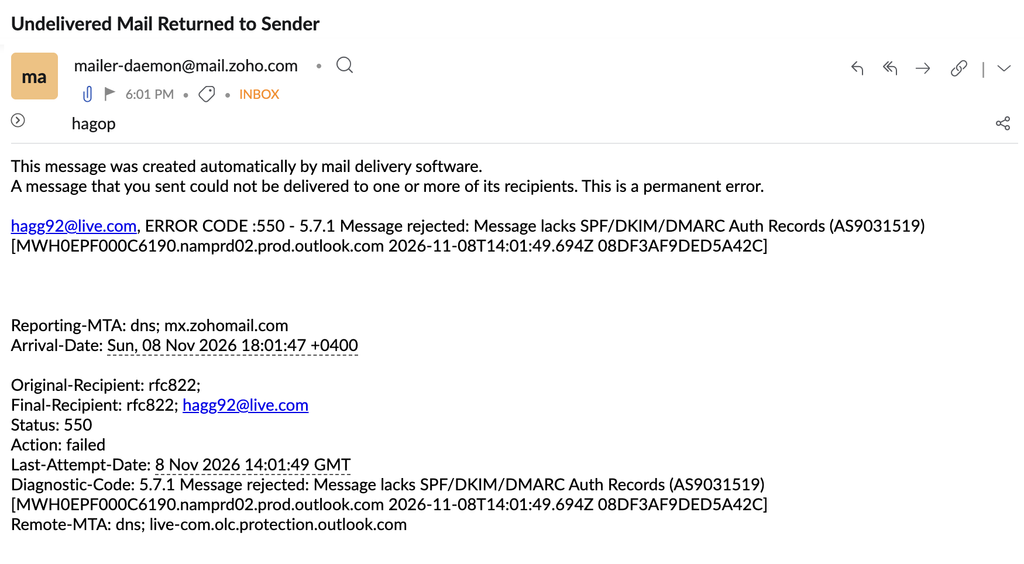
Note the Remote-MTA. The olc in live-com.olc.protection.outlook.com stands for Outlook Consumer. That’s the infrastructure behind the free mailboxes.
Who is affected
- Recipients: Microsoft’s consumer mailboxes only, meaning outlook.com, hotmail.com, live.com, msn.com and their country variants. Microsoft 365 business tenants with custom domains don’t appear to be affected as recipients.
- Senders: any domain without a DMARC record, regardless of volume. That includes Microsoft 365 customers who never published DMARC, since Microsoft 365 doesn’t create one for you.
- Pattern: it’s intermittent. Some messages from the same domain get through, others bounce. If your test message landed, that doesn’t mean you’re fine.
There is also a smaller set of reports from senders who say their SPF, DKIM and DMARC are all in place and they still get rejected, sometimes paired with 550 5.7.23 (SPF violation). Those may be misconfigurations, or a second issue on Microsoft’s side. We’d treat them separately until there’s more data.
Is this official?
No. As of November 8, 2026, Microsoft has published nothing about it. We checked the Microsoft Defender for Office 365 blog, the Outlook.com sender support pages and the Outlook.com known-issues list. Nothing.
The discussion so far lives in community forums and operator mailing lists, and none of it comes from Microsoft. Nobody at Microsoft has confirmed this rejection as a known incident or as a new rule.
So there are three possible readings:
- A deliberate, unannounced policy change. Microsoft decided every domain sending to consumer mailboxes needs DMARC, and is rolling it out gradually.
- A staged rollout of something announced later. Microsoft has done quiet enforcement before and documented it afterwards.
- A filtering bug or misfire (Highly Unlikely). This would fit the intermittent pattern and the reports from fully authenticated senders.
Our read: the behavior is too consistent to be random. Domains without DMARC get hit, adding even p=none fixes it, and the bounce text names the missing records. That looks like a rule. Whether Microsoft keeps it, softens it or formalizes it is still open. Plan as if it stays.
We’ll update this post if Microsoft says anything.
What Microsoft did publish, and how this is different
Microsoft does have written sender requirements. In April 2025 it announced new requirements for high-volume senders to Outlook.com, Hotmail and Live. Domains sending over 5,000 messages a day had to pass SPF and DKIM and publish DMARC at p=none or stronger, aligned with SPF or DKIM. The original plan was to route non-compliant mail to Junk first. A later update changed that to outright rejection, and enforcement started May 5, 2025 with 550 5.7.515 Access denied.
The new rejection breaks from that in five ways:
| May 2025 bulk sender rule | November 2026 rejection | |
| Announced | Yes, Microsoft blog | No |
| Who it applies to | Domains sending 5,000+ messages/day | Any domain without DMARC, any volume |
| Bounce code | 550 5.7.515 Access denied | 550 5.7.1 Message lacks SPF/DKIM/DMARC Auth Records (AS9031519) |
| What the bounce tells you | SPF, DKIM and DMARC results | Only that records are missing |
| Consistency | Deterministic | Intermittent |
The volume threshold is the big one. For 18 months, small senders assumed Microsoft’s DMARC requirement didn’t apply to them. That assumption just stopped being safe.
Microsoft just went further than Yahoogle
When Google and Yahoo announced their sender requirements in October 2023, the industry had about four months to prepare. Enforcement started in February 2024 and ramped up gradually, first with temporary errors, then with rejections for a share of non-compliant traffic. Everyone knew the rules and the thresholds.
Those rules split senders into two tiers. Every sender needed SPF or DKIM. Only bulk senders, 5,000+ messages a day, needed DMARC. A small business with SPF and DKIM and no DMARC was compliant with Gmail and Yahoo then, and still is today.
Microsoft has now quietly erased that line for its consumer mailboxes.
| Google and Yahoo (Feb 2024) | Microsoft Outlook.com (May 2025) | Microsoft Outlook.com (Nov 2026, observed) | |
| Announced in advance | Yes, ~4 months | Yes, ~1 month | No |
| Senders below 5,000/day | SPF or DKIM | Not covered | DMARC record required |
| Senders above 5,000/day | SPF, DKIM, DMARC p=none+, alignment | SPF, DKIM, DMARC p=none+, alignment | Same, plus the new rejection |
| Other bulk requirements | One-click unsubscribe, spam rate under 0.3%, PTR, TLS | Recommended hygiene, not mandated | No change known |
| Rollout | Gradual, temp errors first | Rejection from day one | Intermittent rejection, no warning |
| Bounce clarity | Specific codes with links to guidelines | 5.7.515 lists auth results | 5.7.1 |
The irony is hard to miss. Yahoogle was the loud one, and Microsoft was seen as the laggard that followed a year later. Now Microsoft is the first of the big three to effectively require DMARC from every sender, regardless of volume, and it did it without saying a word.
p=none fixes the bounce. It doesn’t fix the problem.
ESPs, CRMs and hosting providers are already flooded with tickets on this. The standard advice going out is the same everywhere: publish v=DMARC1; p=none and you’re done. Technically, that works. Senders who added the record report that delivery resumes once it’s live.
But look at what that record actually does. It tells receivers your domain uses DMARC, then tells them to take no action when a message fails. With no rua tag, nobody receives any reports. You’ve satisfied Microsoft’s check and learned nothing about your own mail.
One operator on mailop raised a fair question. If Microsoft already sees valid, aligned SPF and DKIM, why demand a published policy that says “do nothing”? Our answer: a DMARC record is a statement of intent. It tells receivers that someone owns this domain’s authentication and is paying attention. A bare p=none with no reporting is the empty version of that statement.
Here’s what a rushed p=none leaves on the table:
- No visibility. Without aggregate reports you don’t know which services send as your domain, which ones fail alignment, or who is spoofing you.
- No protection. p=none doesn’t stop anyone from sending phishing as your domain. Only quarantine or reject does.
- No path forward. Microsoft’s bar today is a record. Gmail and Yahoo’s bar for bulk senders is alignment. The direction of travel for every mailbox provider is enforcement. A domain parked at p=none forever will hit the next wall too.
- Hidden failures. Many domains that “have SPF and DKIM” are signing with the provider’s domain, not their own. Microsoft 365, for example, signs with your onmicrosoft.com domain until you enable DKIM for your custom domain. That passes DKIM but doesn’t align, so it doesn’t count for DMARC.
What to do now
If you’re bouncing right now, the fix is a DMARC record. Here’s how to set it up with EasyDMARC so it does more than stop the bounce:
- Sign up for EasyDMARC and add your domain.
- Publish a DMARC record at p=none. This is the step that stops the Outlook.com rejections, as soon as the record is live in DNS.
- Use your EasyDMARC reporting address in the rua tag. Every account gets its own unique address in the form [your-id]@rua.easydmarc.com (or .us, depending on your account’s region). Copy the exact address from your dashboard. Your record will look like this:
_dmarc.yourdomain.com TXT "v=DMARC1; p=none; rua=mailto:[your-id]@rua.easydmarc.com"
4. Resend anything that bounced. A 5xx is permanent, so Outlook.com won’t retry it.
5. Investigate your reports. Give it two to eight weeks, depending on the complexity of your email ecosystem. EasyDMARC shows every service sending as your domain and which ones fail SPF or DKIM alignment.
6. Fix what the reports surface. The usual suspects:
- More than one DMARC record at _dmarc. Two records means no valid record.
- SPF missing a sender or going over 10 DNS lookups.
- Platforms signing DKIM with their own domain instead of yours: Microsoft 365, Google Workspace, your ESP, your CRM, your helpdesk.
7. Move to enforcement. Go to p=quarantine, then p=reject, once legitimate mail passes consistently. That’s where DMARC actually starts protecting your domain.
Note: Parked and non-sending domains can go straight to v=DMARC1; p=reject; rua=mailto:[your-id]@rua.easydmarc.com.
If you’re an ESP, CRM or host, audit your customer base for sending domains with no DMARC record and reach out before the tickets do.
If you have DMARC and still get this bounce, check the full headers of a delivered copy for dmarc=pass. If it passes and you’re still rejected, collect the full bounce with the server name and timestamp and open a case through Microsoft sender support.
The bigger picture
For years, DMARC was sold as protection against spoofing. Then Yahoogle turned it into a deliverability requirement for bulk senders. This week, Microsoft turned it into a deliverability requirement for everyone sending to its consumer mailboxes, whether or not it meant to announce it.
The lesson isn’t “add p=none and move on.” Mailbox providers are now treating the absence of DMARC as a signal on its own. The domains that will keep landing without surprises are the ones where someone actually reads the reports, knows every sending source, and has a path to enforcement.
The record takes five minutes. Doing DMARC properly takes a few weeks. This is a good week to start.

 We’re glad you joined EasyDMARC newsletter! Get ready for valuable email security knowledge every week.
 You’re already subscribed to EasyDMARC newsletter. Continue learning more about email security with us