
It’s 2027 approaching, and email is still one of the most common entry points for cyberattacks.
Phishing and invoice fraud have existed for years and continue to cause financial damage to organizations. The FBI’s 2025 Internet Crime Report attributes $3 billion in annual losses solely to Business Email Compromise (BEC) incidents.
One way to tackle the threat is to implement reliable email security tools. This guide compares the best email security gateway solutions for small businesses and large organizations. For each solution, we examine its features, strengths, limitations, and the type of business it best suits.
What Is a Secure Email Gateway?
A Secure Email Gateway (SEG) is a security layer between the outside world and your email server.
Every incoming message is scanned before delivery, and outgoing mail is also checked before it leaves. Clean messages pass through, while unwanted messages and phishing attempts are blocked.
A typical email security gateway combines several capabilities:
- Spam filtering and malware detection, including attachment sandboxing.
- Phishing and impersonation detection, such as look-alike domains.
- Data loss prevention and encryption.
- URL filtering that rewrites or checks links at the moment they are clicked.
- Email continuity that ensures emails get delivered even during a server outage.
While SEG is a powerful solution, it’s not enough to ensure email protection. For example, domain authentication and DNS/reporting visibility are also important and often used alongside an SEG. To better understand the relationship between SEGs and DMARC, please refer to this article.
However, SEG is often confused with other solutions. Vendors blur the lines between SEGs, API-based tools, and even protection built into Microsoft 365 and Google Workspace. And when on top of this, you add marketing copy, PR, performance-driven ads, articles from external contributors, social media content, and tons of other materials, it becomes hard to understand what your business actually needs.
Yet, the distinction between SEGs, API-based tools, and native email protection matters. Understanding what each one entails will help you avoid choosing the wrong solution. So, let’s take a look at what they mean.
Secure Email Gateway
This is a gateway that sits directly within the mail flow.
You point your domain’s MX record to the service provider, and the solution scans every message, then forwards only the safe ones. It operates in transit, so threats would not reach the inbox. It can work with any email platform like Microsoft 365 and Google Workspace, as well as on-premises servers.
The trade-off lies in visibility. A gateway sees mail as it crosses the perimeter, so it has limited insight into internal messages. For example, it won’t protect the company from a phishing email sent from the account of an already compromised colleague.
SEGs are not impenetrable, but their biggest benefits come from detecting and neutralizing zero-day threats and viruses.
API-Based Email Security
API-based email security tools connect directly to Microsoft 365 and Google Workspace and analyze messages within the mailbox.
No need to change MX records here, which makes the setup more straightforward. These tools inspect internal emails and user behavior, helping detect account takeovers and lateral phishing. API-based tools can also retrieve malicious messages after they have been delivered.
The limitations of API-based email security solutions are scope and timing. Many API-based tools operate after the message arrives, creating a vulnerability.
They also function only with supported platforms and rarely include continuity features. So, to summarize, SEG blocks malicious emails before delivery, while API tools clean up inside mailboxes.
Native Email Protection
Native protection refers to tools like Microsoft Defender for Office 365 or Gmail’s built-in filtering. They are quite convenient and require no additional deployment.
It’s a solid baseline for many organizations, but it represents a single-vendor defense. Attackers develop their schemes and test their campaigns against them.
Good news for customers, though! These three categories are merging. Many traditional email security solutions now offer both email security gateway and API-based add-ons. That’s why it is often possible to cover both pre-delivery filtering and post-delivery threat detection from a single provider.
This also means that a provider referencing its email security software does not guarantee gateway filtering, even when it is part of a bigger platform. So, if a product connects exclusively via API, we haven’t included it on our list.
Email Security Gateway Comparison
| Product | Architecture | Standout Feature |
| Proofpoint Core Email Protection | Gateway, optional API | Threat detection depth |
| Mimecast Email Security | Gateway + API | Continuity and archiving |
| Barracuda Email Protection | Gateway + API | Pre- and post- delivery protection |
| Sophos Email | Gateway or M365 API | Sophos central integration |
| Cisco Secure Email | Cloud, virtual or on-prem gateway + API option | Threat intelligence |
| FortiMail | Cloud or appliance gateway + API connectors | Flexible deployment modes |
| Hornetsecurity 365 Total Protection | Cloud gateway | 10-year archiving |
Proofpoint Core Email Protection

A popular choice among organizations operating within strictly regulated environments. It can be deployed as a gateway or via API. This solution includes AI-based detections, sandboxing, and remediation processes.
Pros: Robust threat detection, extensive ecosystem of tools for data loss prevention, archiving.
Cons: The costs make this solution unattainable for most SMBs and typically require multi-year contracts.
Pricing: Costs are determined based on a custom quote. The ‘Essentials’ suite for smaller businesses costs approximately $4-10 per user, per month and approximately $10-15 for a fully-featured enterprise deployment.
Ideal for: Enterprises in industries subject to targeted attacks.
Mimecast Email Security

Mimecast combines gateway-level filtering with an API-based layer. It is fairly popular among organizations using Microsoft 365, which doesn’t include a traditional SEG. Mimecast’s email security solution includes protection for links and attachments and defensive mechanisms against impersonation.
Pros: Offers robust continuity and archiving features, which makes it a great fit for teams facing strict compliance requirements.
Cons: Customers report price increases with little room for negotiation, and costs rise sharply as additional modules are added.
Pricing: The cost for basic protection is estimated at $4-6 per user per month, while a full-scale package deployment ranges from $8-13.
Ideal for: Mid-sized businesses that want to combine the usual security features with business continuity.
Barracuda Email Protection
Barracuda seems to be a go-to pick for small and medium-sized businesses. It combines gateway-level security with API-based protection, and defends against 13 types of email threats. The top-tier package includes protection against domain fraud, cloud archiving, and security awareness training.
Pros: Multi-layered protection covering both pre- and post- delivery. A free ‘Email Threat Scan’ identifies threats present in your inboxes without the need to change your MX records.
Cons: No publicly available price list. This makes comparing available packages possible only after contacting sales.
Pricing: Provided upon request. Estimated costs start at $6.70 per user, per month.
Ideal for: SMBs looking for a versatile solution from a single provider.
Sophos Email
The most logical choice for companies already within the Sophos ecosystem. It can operate as a gateway or via the Microsoft 365 mail flow API. The solution offers core threat protection, click-time URL protection, and integrated training via Phish Threat.
Pros: Competitive pricing and simple management.
Cons: Archiving and business continuity features are quite limited.
Pricing: Licensed per mailbox and based on user tiers. $33-50 range per user annually, $50-75 for the newer Sophos Email Plus.
Ideal for: SMBs that are integrated into a broader suite of Sophos solutions.
Cisco Secure Email
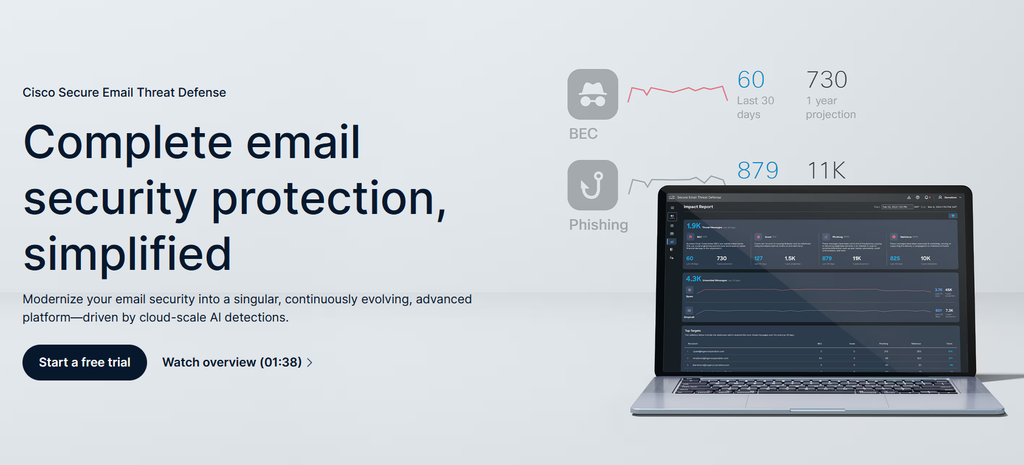
Formerly known as IronPort, offers the widest range of deployment options. It supports a cloud gateway mode, hybrid model, and an API-based ‘Cloud Mailbox’ option. Threat detection leverages intelligence from Cisco Talos.
Pros: Flexible deployment and tight integration with other Cisco products.
Cons: Flexibility becomes a source of complexity.
Pricing: The cloud gateway is estimated at $4-6 per user, per month. On-premises hardware is priced separately.
Ideal for: Large organizations that rely on Cisco solutions or require hybrid or on-premises email management.
FortiMail
The most flexible option infrastructure-wise. It can operate in gateway, server, or transparent mode. API integrations for Microsoft 365 and Google allow for message recall even after delivery. Business continuity features require the use of gateway mode in the cloud version.
Pros: Can be deployed via physical appliances, virtual machines, or the cloud. It is the best choice for organizations that want to control where their emails are processed.
Cons: Transparent mode is not available in FortiMail Cloud. Additionally, deployments using physical appliances require more manual management.
Pricing: No publicly available price list, but licensing is based on the device and feature bundle.
Ideal for: Companies with on-premises email servers, strict data requirements, and those that already utilize a Fortinet environment.
Hornetsecurity 365 Total Protection
Hornetsecurity is designed around Microsoft 365 and represents the most budget-friendly option. It requires no hardware whatsoever and includes protection against spam and malware, content inspection, compliance filters, real-time monitoring, and archiving with data retention of up to 10 years.
Pros: Low cost and an archiving function fill the gap in Microsoft 365 capabilities.
Cons: Pricing is determined through consultations with partners. Solutions are less suitable for complex enterprise environments.
Pricing: The Business plan costs approximately $3 per user per month.
Ideal for: SMBs that use Microsoft 365 and are looking for an affordable price.
Things to Consider When Choosing a Secure Email Gateway
The right choice depends on how exactly your organization manages email. Refer to these tips to choose between the seven products mentioned above.
Align Architecture With Mail Environment
If you use Exchange on-premises or a hybrid setup, Cisco and FortiMail offer the most deployment options, including physical and virtual solutions. If you rely on Microsoft 365, Hornetsecurity and Sophos fit better into the environment.
Proofpoint, Mimecast, and Barracuda fall somewhere in the middle. They offer both an API layer and a security gateway that lets you add threat detection capabilities after message delivery without adding another vendor.
Prioritize Detection Mechanisms
What matters most today is detecting impersonations, as attackers increase the volume of those attacks. APWG recorded a 10% increase in phishing attacks in the second quarter of 2026, while Verizon found that phishing was still the initial access method in 16% of breaches.
In cases where attackers used AI, phishing was also the most common attack method. So doing more research into how vendors detect spoofing and decoys is a must. Ask to see how their tools perform when testing your own email for best results.
Consider Additional Features
Business continuity, archiving, and data loss prevention are all supplemental features, but they could force you to purchase a separate product.
To avoid overspending, Mimecast and Hornetsecurity are better choices, while Sophos is more limited. Proofpoint and Barracuda cover those needs through add-ons and superior service packages, so keep that in mind.
If your industry requires long-term data retention, weigh these factors more heavily than overall threat detection scores.
Test How It Handles Legitimate Correspondence
An overly restrictive gateway can create its own set of problems.
URL rewriting, time-of-click scanning, and strict email quarantine rules can interfere with legitimate automated messages such as password resets, invoices, and login links. Emails containing magic links, for instance, often fail for this very reason, as a security scanner may follow the link before the user does.
Ask vendors how they manage allowlists and transactional senders, and run a pilot program using your actual email traffic before committing.
Compare the Total Cost
Most of the vendors listed in the article do not disclose their pricing publicly. Please remember that the figures above are estimates.
Still, you can get a sense of price tiers across the products. Hornetsecurity and Sophos offer more budget-friendly options, while Proofpoint, Cisco, and Mimecast ask more for their enterprise-level solutions.
And while multi-year contracts usually reduce the fees, at the same time they require your company to make a long-term commitment.
Stay Realistic About Your Admin Work
Products based on specific equipment offer extensive customization, but also require dedicated professionals to manage them.
Conversely, a smaller IT department will benefit more from a cloud-based solution with reasonable default settings. Consider free options as well.
For example, Barracuda’s Email Threat Scan tool lets you see what’s in your mailboxes without requiring changes to your MX record.
Is a Secure Email Gateway Enough for Full Email Security?
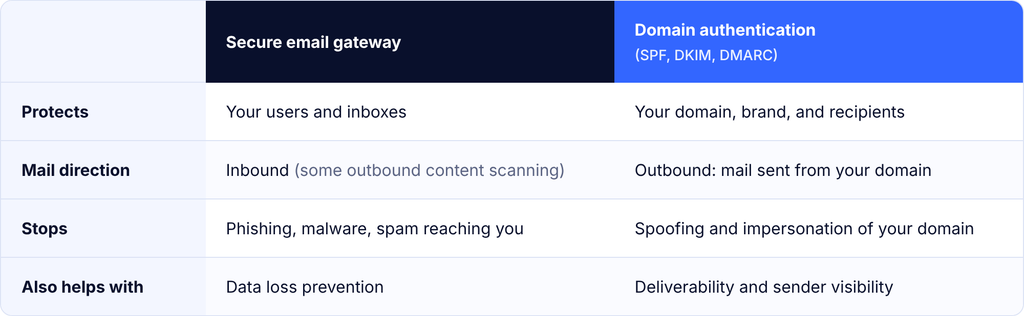
A gateway is built to protect the mail you receive. It scans inbound messages for phishing, malware, and impersonation before they reach your users. Some gateways also scan outgoing mail, but that checks content, such as spam or sensitive data leaving the company. It doesn’t control who else can send email in your name.
That is the outbound gap.
If an attacker spoofs your domain to send fake invoices or payment requests to your customers, partners, or employees, the message never passes through your gateway. It lands in their inbox, with your brand on it. Only domain authentication can stop that.
SPF, DKIM, and DMARC let receiving servers verify that a message using your domain was authorized by you, and tell them to quarantine or reject it if not. EasyDMARC helps you set up and manage these records and move safely to enforcement. Once DMARC is at enforcement, spoofed mail is quarantined or rejected at the recipient’s end, whatever gateway they use. It also affects delivery: major mailbox providers now require authentication from bulk senders, so unauthenticated legitimate mail is more likely to land in spam or be rejected.
Frequently Asked Questions
Microsoft 365 does not include a traditional email security gateway, although it does feature built-in filtering capabilities.
Defender for Office 365 Plan 1 is now included in Microsoft 365 E3 and Business Premium subscriptions, providing protection through features such as Safe Links, Safe Attachments, and impersonation protection.
For basic filtering, this may be sufficient.
Yes, and many organizations do so to achieve “defense in depth.”
Configure the “Enhanced Filtering for Connectors” feature so that Defender sees the actual sender addresses, while the security gateway remains on the front line. Additionally, restrict inbound mail to accept messages only from the security gateway’s addresses.
Otherwise, attackers who discover the direct Microsoft endpoint for your tenant could bypass the security gateway.
A security gateway sits in the path of your email flow.
You configure your MX record to point to it, and it filters messages before they are delivered. In contrast, API-based tools connect to Microsoft 365 or Google Workspace and neutralize threats after messages have been delivered.
Because they operate within the mailbox, they also have visibility into internal email, something security gateways typically cannot do. Many providers now offer both types of solutions.
It helps, but it is not a complete solution.
Security gateways can detect executive impersonation, look-alike domains, and suspicious requests before messages are delivered. They are less effective against attacks originating from compromised legitimate accounts or internal communications. API-based solutions are better suited to these scenarios.
To mitigate BEC risk, choose a product that protects against impersonation and consider a hybrid configuration.
Yes. A gateway filters what reaches your inbox, while DMARC controls whether attackers can send mail that pretends to be your domain. They address different sides of the problem, and most organizations benefit from both.

 We’re glad you joined EasyDMARC newsletter! Get ready for valuable email security knowledge every week.
 You’re already subscribed to EasyDMARC newsletter. Continue learning more about email security with us