
Key Takeaways
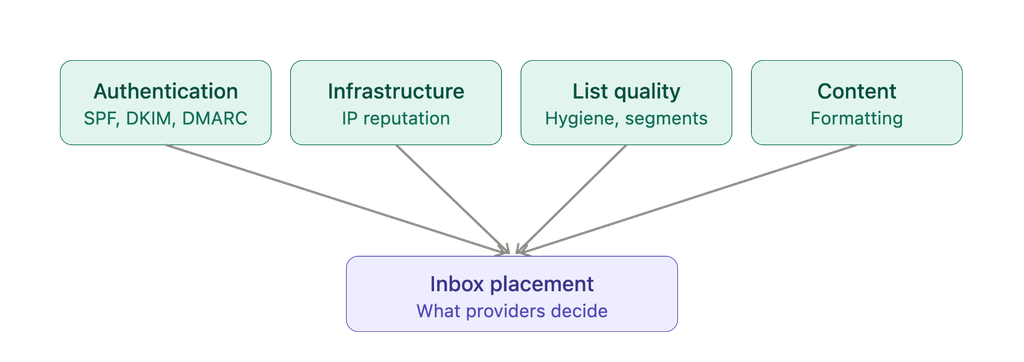
- Authenticate every sending source with SPF, DKIM, and DMARC. Misaligned or missing records are among the most common reasons legitimate email ends up in spam.
- A clean sending infrastructure, consistent DNS records, and a properly warmed-up IP all shape how mailbox providers judge your domain, independent of your content or list quality.
- List hygiene and audience segmentation reduce bounce rates and spam complaints, which are two of the strongest signals mailbox providers use to judge sender reputation.
- Link structure, URL hygiene, and formatting choices affect both spam filter decisions and recipient engagement.
- Monitoring engagement metrics and feedback loops lets you catch reputation problems while they’re still small, rather than after inbox placement has already dropped.
- Deliverability isn’t a one-time setup. Reviewing authentication, engagement trends, and domain health on a regular schedule helps keep inbox placement stable over time.
Authenticate Your Emails with SPF, DKIM & DMARC
If you want to improve email deliverability, the first step is to make sure your messages are properly authenticated. Authentication helps mailbox providers verify that your emails are legitimate and builds trust in your domain. The three main email authentication protocols, SPF, DKIM, and DMARC, work together to protect your domain and improve your chances of reaching the inbox.
SPF (Sender Policy Framework) authorizes sending IP addresses for the envelope domain used in the SMTP MAIL FROM command, not the visible From address the recipient sees. This distinction is what makes DMARC alignment necessary. You can verify your setup with an SPF checker to confirm your record is published correctly and lists the right sending sources.
DKIM (DomainKeys Identified Mail) adds a digital signature that confirms the message wasn’t altered in transit. A DKIM checker can verify that your signature and public key are properly set up.
DMARC (Domain-based Message Authentication, Reporting, and Conformance) requires at least one of SPF or DKIM to both pass and align with the RFC5322. From domain visible to the recipient, and applies the policy you choose if a message fails that evaluation.
Without proper alignment, even genuine messages can be flagged as suspicious or sent to spam, lowering your sender reputation. The DMARC checker identifies misconfigurations in your DMARC record before they start costing you inbox placement.
DMARC also allows flexible enforcement levels, like none, quarantine, or reject, so you can begin with observation and move toward full enforcement without losing useful traffic. Reliable authentication directly strengthens your sender reputation and inbox placement. That’s one of the main reasons DMARC plays such a crucial role in email deliverability, helping organizations maintain both security and consistent inbox performance.

Bulk Sender Requirements from Google, Yahoo, and Microsoft
Since February 2024, Google and Yahoo have required senders delivering 5,000 or more messages per day to their consumer domains to meet a defined set of authentication and hygiene standards. These include SPF and DKIM authentication, a published DMARC record at minimum p=none, one-click unsubscribe with requests honored within two days, TLS encryption, valid forward and reverse DNS, and a spam rate consistently below 0.3%. Non-compliant mail is subject to deferral or rejection.
Microsoft extended equivalent requirements to outlook.com, hotmail.com, and live.com from May 5, 2025, applying the same 5,000 messages per day threshold. Senders must have SPF, DKIM, and DMARC at minimum p=none in place. Non-compliant mail is junked, with permanent rejection at 550 5.7.15 Access denied at enforcement. Verify current requirements against Microsoft’s published sender documentation before deployment.
Maintain a Clean Sending Infrastructure & IP Reputation
A clean and stable sending setup plays a big role in how mailbox providers view your domain. Even with perfect content and authentication, your emails can still land in spam if your technical setup isn’t right. Building a strong foundation helps improve email deliverability and keeps your sender reputation healthy over time.
Your IP address is one of the first things email services check when deciding where to place your messages. With a shared IP, your reputation depends on everyone using that server, meaning someone else’s poor sending habits can affect your results. A dedicated IP, on the other hand, gives you full control but requires consistent sending to maintain trust.
New domains or IPs require a warm-up period where volume increases gradually over several weeks, typically starting at a few hundred messages per day and doubling every few days as positive engagement signals accumulate. Dedicated IP practical minimums generally start around 100,000 messages per month. Senders below that threshold are generally better served by a reputable shared IP pool.
Separating sending programs across subdomains is standard practice for protecting sender reputation. Marketing, transactional, and cold outreach should send from separate subdomains so that reputation issues in one program do not affect delivery for the others.
Consistency across your DNS and “From” records also matters. If your domain name, subdomains, or hostnames don’t match your authentication setup, it can confuse filters and lower trust. Setting up forward-confirmed reverse DNS (FCrDNS) means the PTR record for your sending IP must resolve to a hostname, and that hostname must resolve forward to the same IP. This is a pass/fail check at many mailbox providers and missing or mismatched FCrDNS is a common cause of deferrals.
Practice List Hygiene & Segmentation
A healthy contact list is one of the strongest indicators of good sender reputation and directly helps improve email deliverability. Mailbox providers and spam filters pay close attention to how recipients react to your messages. When you consistently send emails to valid and active contacts, you show that your messages are relevant and wanted, which earns more trust from mailbox providers.
List Cleaning and Bounce Management
Start by reviewing your list regularly and removing addresses that are no longer valid or engaged. Hard bounces happen when an address doesn’t exist, while soft bounces are usually caused by temporary issues, such as a full inbox or server error. If the same address keeps bouncing, it’s best to remove it instead of risking your sender reputation.
| Soft bounce | Hard bounce | |
| Cause | Full inbox, temporary server error, message too large | Address doesn’t exist, domain invalid, mailbox permanently closed, or server-side rejection based on reputation or policy (e.g. 550 5.7.1, 550 5.7.15). Classify by SMTP enhanced status code before removing. |
| Retry? | Yes, a few attempts over a few days | No |
| Action | Monitor; remove if it keeps recurring | Remove from your list immediately |
| Risk if ignored | Low at first, grows if repeated | High, signals poor list maintenance to mailbox providers |
Note: Not all 5xx rejections indicate an invalid address. A 550 5.7.1 or 550 5.7.15 response is a reputation or policy block, not a non-existent mailbox. Removing those addresses is the wrong action and will shrink a healthy list. Always review the enhanced status code before deciding whether to suppress.
Pay attention to recipients who haven’t opened your emails for a long time. Re-engagement campaigns can help you win them back, but if they still remain inactive, it’s better to unsubscribe them automatically than continue sending unwanted messages.
Another important aspect of list hygiene is that mailbox providers and blocklist vendors often place spam traps within mailing lists to highlight expired or inactive email addresses. Sending emails to these addresses signals poor list hygiene and can harm your sender reputation. Regular email verification helps reduce the risk of hitting typo and pristine spam traps. Recycled traps are former real mailboxes that accept mail and cannot be detected by verification tools. The only protection against recycled traps is sunsetting contacts who have been inactive for an extended period.
Audience Segmentation
Segmentation is just as important as cleaning. By grouping contacts based on their interests, engagement history, or frequency preferences, you can send more personalized and meaningful content. For example, frequent buyers might receive product updates, while new subscribers get welcome tips or educational material. This keeps your click-through rates and engagement signals strong, showing mailbox providers that your emails are valuable and relevant.
Good list hygiene and smart segmentation work hand in hand. They reduce spam complaints, keep bounce rates low, and make your campaigns more consistent in the long run. These habits are among the most effective email deliverability best practices, simple to manage and essential for building lasting trust with both mailbox providers and your audience.
Optimize Email Content & Formatting
Your email’s structure and style play a major role in how mailbox providers judge its credibility. Even with solid authentication and a clean sender reputation, the way your message looks, reads, and functions can still affect inbox placement. A well-balanced layout, clear language, and safe formatting all work together to improve email deliverability and help your messages make a positive first impression.
Link Formatting and URL Hygiene
Links are evaluated independently of sender reputation. Every URL in a message body is checked against URI blocklists including Spamhaus DBL, SURBL, and URIBL. A single listed domain in a link can result in spam folder placement even when the sender is fully authenticated and has a clean reputation.
Use a branded tracking CNAME such as track.yourdomain.com rather than a shared ESP tracking domain, which carries the reputation of every other customer on that provider. The tracking domain must have a valid HTTPS certificate. A tracking link without SSL is both a browser warning and a filter signal.
Keep redirect chains short. A link that passes through a tracker, then a shortener, then a destination reads as cloaking behavior. Never use public URL shorteners such as bit.ly or tinyurl.com. They are frequently listed on URI blocklists and hide the destination from filters, which is the same pattern phishing uses.
The registrable domain in your links should match your sending brand. A mismatch between the visible From domain and link destinations is a textbook phishing pattern that filters are specifically trained to detect.
Newly registered domains appearing in links are treated as high risk regardless of sender reputation, typically for the first 30 days after registration. Avoid using new microsites in production campaigns until they have established history.
Anchor text must match the href destination. If the visible text shows one URL and the href resolves elsewhere, that is a phishing heuristic. Plain-text links in the message should match their HTML counterparts.
Check destination pages before sending. A broken SSL certificate, a redirect to a parked domain, or a credential form on the landing page will damage the link domain’s reputation across future sends. Unsubscribe links and image hosting domains are evaluated the same way as body links.
Monitor Engagement Metrics and Feedback Loops
Understanding which strategy will improve email deliverability starts with looking at how your audience responds. Mailbox providers judge your reputation based on engagement, so consistent interaction tells them your messages are wanted and relevant, and worthy of landing in the inbox.
The key engagement metrics to watch are click-through rates, reply rates, spam complaints, and domain reputation as reported in tools like Google Postmaster Tools. Open rates have become unreliable as a primary signal since Apple Mail Privacy Protection prefetches pixel loads regardless of whether the recipient actually opened the message. Clicks, replies, and complaint rates reflect genuine engagement more accurately. Spam complaints indicate problems that need quick attention. Even a small rise in complaint rates can affect your reputation, so it’s important to understand what triggers them, including too many emails, irrelevant content, or unclear unsubscribe options.
Many major email services, including Gmail and Yahoo, offer feedback loops that provide valuable data about how recipients react to your messages. These reports show patterns, such as which campaigns are being ignored or flagged as spam, helping you identify what to adjust. If you notice lower engagement, it may be time to refresh your content, review your segmentation, or slow down your sending frequency.
Another smart habit is removing or reducing communication with unengaged contacts. Continuously sending to people who don’t open or click sends a negative signal to mailbox providers. Instead, focus on the subscribers who interact with your messages. You can re-engage inactive users through targeted campaigns, but if there’s still no activity, it’s best to remove them to keep your list healthy.
Manage Bounces, Complaints, and Unsubscribes
Even the best-managed email strategy needs regular maintenance. Over time, some addresses become invalid, engagement levels change, and subscribers may decide they no longer want to receive your messages. How you handle these signals plays a big role in your sender reputation and overall performance. Managing bounces, complaints, and unsubscribes correctly is one of the most reliable ways to protect your domain and follow best practices for email deliverability.
Bounces are common and come in two main types: soft and hard.
Soft bounces usually result from temporary issues like a full inbox or a brief server problem. Some 4xx codes, such as Gmail’s 421 4.7.28, are rate or reputation signals rather than capacity issues. Retrying without addressing the underlying cause will not resolve them.
It’s best to retry soft bounces a few times and remove hard bounces right away. Continuing to send to invalid addresses signals to mailbox providers that your list isn’t properly maintained, which can lead to more of your messages being filtered out.
Spam complaints are another factor that can quickly harm your reputation. Gmail’s own sender guidelines ask senders to keep their user-reported spam rate under 0.10%, and to never let it reach 0.30% or higher, since rates at or above that level carry a much heavier penalty on inbox delivery.
| Spam complaint rate | What it means |
| Under 0.10% | Google’s target zone for healthy senders |
| 0.10% – 0.30% | Above target, delivery impact starts building |
| 0.30% or higher | Heavier penalty on inbox delivery, per Gmail’s guidelines |
To stay well under that line, bulk senders must implement one-click unsubscribe per RFC 8058, using both the List-Unsubscribe and List-Unsubscribe-Post headers, and must honor requests within two days. A visible unsubscribe link in the message body is necessary but not sufficient on its own for bulk sending compliance. Sending at a reasonable frequency also helps keep complaint rates low.
Allowing users to choose what kind of content they receive also helps reduce complaints and keeps your list more engaged.
Unsubscribes should always be handled quickly and respectfully. Honoring opt-out requests is a legal requirement in most regions, not just a good practice. Trying to hold onto disinterested contacts only increases spam complaints and lowers engagement. A smaller but active audience will always deliver better results than a large, unresponsive one.
Leverage Deliverability & Monitoring Tools
Keeping your email performance strong requires consistent monitoring. Deliverability tools like EasySENDER or Postmaster Tools help you track how well your authentication, reputation, and domain configuration are working together. These tools integrate with Google Postmaster, Amazon SES, and SendGrid, which allows you to monitor campaign performance, sender reputation, and authentication health over time.
Monitoring tools can also check if your SPF, DKIM, and DMARC records are properly aligned, alert you when your domain appears on a blocklist, and show how mailbox providers are responding to your emails. They also help identify issues like DNS misconfigurations or authentication gaps before they start affecting your sender reputation. By reviewing these reports regularly, you can take quick action to fix problems and maintain consistent deliverability.
EasyDMARC is a great example of how these tools simplify domain management and visibility. With built-in options like the DNS checker and email deliverability test, you can easily verify that your records are up to date and correctly configured. The platform also provides detailed reports on authentication results and domain health, helping you monitor changes over time and spot any early warning signs.
Using deliverability and monitoring tools consistently gives you full control over your email environment. Instead of reacting to problems after they happen, you can stay proactive, keeping your authentication aligned, your domain trusted, and your email performance improving.
Troubleshoot Deliverability Issues and Maintain Long-Term Health
A sudden drop in inbox placement can be frustrating, but it’s often a sign that something in your setup or strategy needs attention. The key is to find the root cause early and fix it before it starts affecting your reputation, the same approach Brighton took with EasyDMARC to resolve its own deliverability issues. Regular troubleshooting and maintenance are what keep your email program stable and your deliverability improving over time.
The first step is to analyze your recent results. Compare current open, click, and bounce rates with previous campaigns to spot unusual changes. If engagement has dropped sharply, check your technical setup, as expired SPF, DKIM, or DMARC records can easily cause issues. Misconfigured DNS records, missing alignments, or failed authentication checks are common reasons why legitimate emails get filtered out.
Reputation checks are just as important. Check your domain and IP against established blocklists including Spamhaus SBL, CSS, and DBL. Not all blocklist listings carry equal weight. UCEPROTECT Level 3 is broadly considered unreliable and a listing there rarely affects deliverability at major mailbox providers. Prioritize Spamhaus listings and act on those first. Even one Spamhaus listing can limit inbox visibility until it is resolved. If you’ve recently increased sending volume or changed content styles, mailbox providers may also adjust filtering until they re-establish trust in your new patterns.
To maintain long-term deliverability health, build troubleshooting into your regular routine. Schedule audits of your domain, authentication setup, and sending practices. Test new campaigns with small segments before full rollout and monitor how different inbox providers respond. Keeping a steady eye on your metrics and domain health allows you to catch small issues early, maintain consistency, and ensure your emails continue to reach their audience without interruption.
Strengthening Deliverability Is an Ongoing Process
Email deliverability needs regular care. It isn’t something you configure once and leave alone. Your authentication, content quality, engagement, and domain reputation all play a role in how mailbox providers treat your messages. Treating deliverability as a continuous process helps you stay ahead of problems and keep inbox placement consistent, even as email filters and user behavior change.
Technical Setup Reviews
Set a routine for reviewing your reports, DNS records, and email authentication setup. Small issues like expired SPF, DKIM, or DMARC records can quietly affect how your emails are delivered. Checking your authentication and DNS configuration every few weeks keeps your domain trusted and prevents sudden deliverability drops.
Engagement Trend Tracking
Engagement tells mailbox providers how relevant your content is. Monitor click-through rates, reply rates, and spam complaints to see how well your audience responds. If interaction starts to fall, adjust your frequency, update subject lines, or refresh your segmentation. These small improvements help recover engagement and show providers that your messages remain valuable to readers.
Testing and Auditing
Regular testing helps you catch issues before they turn into bigger problems. Send small test campaigns to verify inbox placement, check how different providers handle your messages, and review any changes in your sender reputation. Periodic audits of your domain setup and deliverability reports ensure your strategy stays reliable and up to date.
Long-Term Consistency
Strong deliverability comes from steady, proactive habits. By keeping your setup aligned, maintaining a healthy contact list, and watching your engagement metrics, you build long-term trust with mailbox providers. Consistency in both technical maintenance and communication is what keeps your messages reaching the people who matter most.

Follow Email Deliverability Best Practices with EasyDMARC
EasyDMARC’s Support Team can help you review authentication, monitor domain health, and troubleshoot deliverability issues as your sending volume grows. Contact us today.
Frequently Asked Questions
The main factors affecting email deliverability are proper authentication, sender reputation, and engagement. Setting up SPF, DKIM, and DMARC correctly helps prove your emails are genuine. A strong reputation, built on clean lists and relevant content, tells mailbox providers your messages can be trusted, and people opening and clicking your emails reinforces that trust.
Check your sender reputation at least once a month, or more often if you send high volumes of email. Regular reviews help catch small issues before they impact performance. Monitor bounce rates, spam complaints, and authentication results to stay aware of how mailbox providers view your domain.
Delivery rate shows how many emails reach recipients without bouncing, while inbox placement shows how many land in the main inbox instead of spam. You can have a high delivery rate but still poor placement if filters see your content as risky or irrelevant. Strong authentication and good engagement help improve both.
SPF authorizes which servers can send emails from your domain, DKIM adds a digital signature to verify message integrity, and DMARC requires at least one of SPF or DKIM to pass and align with the visible From domain. When configured correctly, these protocols protect your domain from spoofing and improve deliverability by confirming that your messages are legitimate.
Most deliverability issues come from configuration or reputation problems, not your email service provider. Domain reputation does not reset when you switch ESPs. The domain’s sending history, complaint rates, and authentication record travel with it regardless of which platform sends the mail. Cleaning your list, improving authentication, sending relevant content, and tracking engagement will have more impact than switching platforms.

 We’re glad you joined EasyDMARC newsletter! Get ready for valuable email security knowledge every week.
 You’re already subscribed to EasyDMARC newsletter. Continue learning more about email security with us