
Campaigner is an email marketing platform that enables businesses to create, automate, and optimize their email campaigns for better engagement and deliverability.
Configuring Campaigner’s SPF and DKIM for Campaigner to ensure DMARC compliance is a straightforward process.
Below are the detailed steps on how to set up the necessary protocols:
How to set up SPF for Campaigner
Campaigner’s SPF value: include:_spf.emailcampaigns.net
If you don’t have an existing SPF record, you will need to create one with the Campaigner’s include mechanism:
Record type: TXT
Record name: your domain
Record value: v=spf1 include:_spf.emailcampaigns.net -all
Here are the steps to create your SPF record:
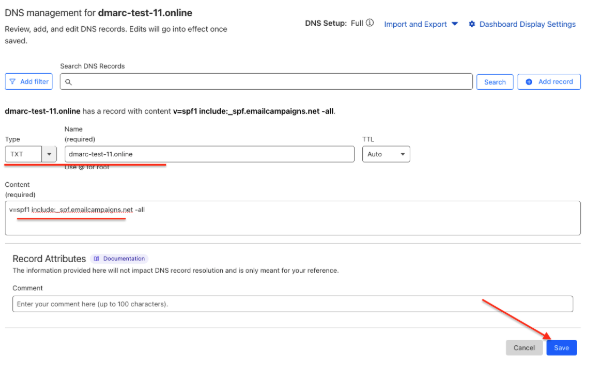
1. Navigate to your DNS zone and add a record (in this example, the DNS provider is CloudFlare).

2. Select TXT as the record type, set the record name to your domain (in this example it is dmarc-test-11.online), enter the record value “v=spf1 include:_spf.emailcampaigns.net -all,” and save the record.
If you already have an existing SPF record for your domain, you just need to add their “include” mechanism. Below are the steps on how to update your existing SPF record by adding Campaigner’s SPF value to it.
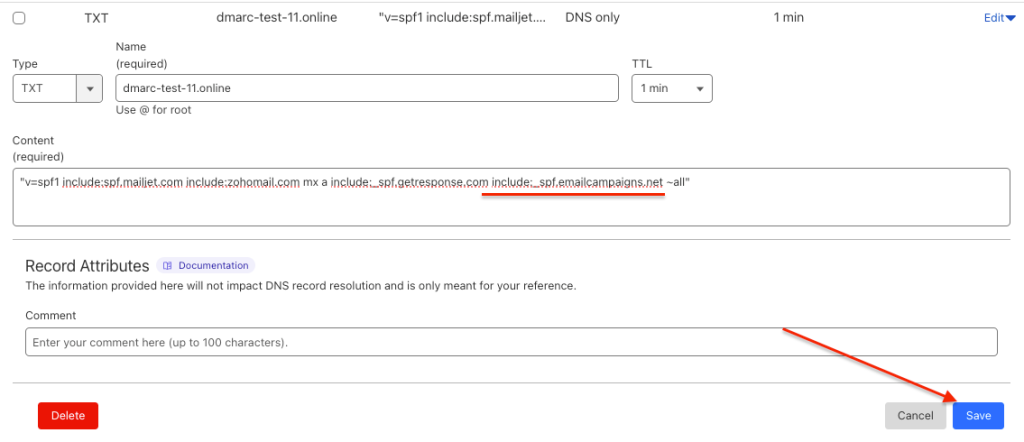
1. Navigate to your DNS zone, locate your existing SPF record, and click on the “edit” button

2. Add Campaigner’s SPF include mechanism include:_spf.emailcampaigns.net to your record and click the “Save” button.
How to set up DKIM for Campaigner
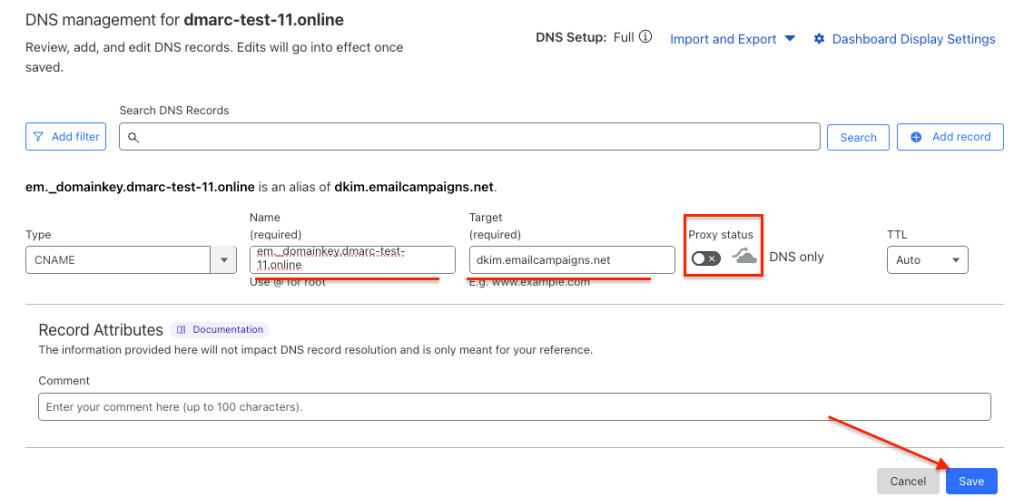
Campaigner provides a CNAME type DKIM record which needs to be published in your DNS zone.
Note: If proxy status is by default enabled for CNAME records in your DNS, make sure to disable it.
Navigate to your DNS zone and create a record with the following metrics:
- Record Type: CNAME
- Host Name: em._domainkey.yourdomain.comContent/Value: dkim.emailcampaigns.net
Note: If you are using GoDaddy, the DKIM record should be set up as follows:
- Record Type: CNAME
- Host Name: em._domainkey (your domain is assumed)
- Content/Value: dkim.emailcampaigns.net
After making these changes, contact Campaigner support team, and their postmaster will verify and sync the settings to complete the setup.
If any further questions arise, don’t hesitate to reach out to EasyDMARC technical support team.

 We’re glad you joined EasyDMARC newsletter! Get ready for valuable email security knowledge every week.
 You’re already subscribed to EasyDMARC newsletter. Continue learning more about email security with us


