
DMARC settings determine how receiving mail servers process messages that fail DMARC evaluation after SPF or DKIM authentication and domain alignment are checked. This configuration controls whether failed messages are monitored, quarantined, or rejected, while also defining how reporting and domain alignment are handled during message evaluation. Understanding what each tag does is essential for moving through the DMARC policy lifecycle without disrupting legitimate mail flow, especially in environments that rely on multiple third-party sending services, subdomains, or distributed email infrastructure.
What Are DMARC Settings?
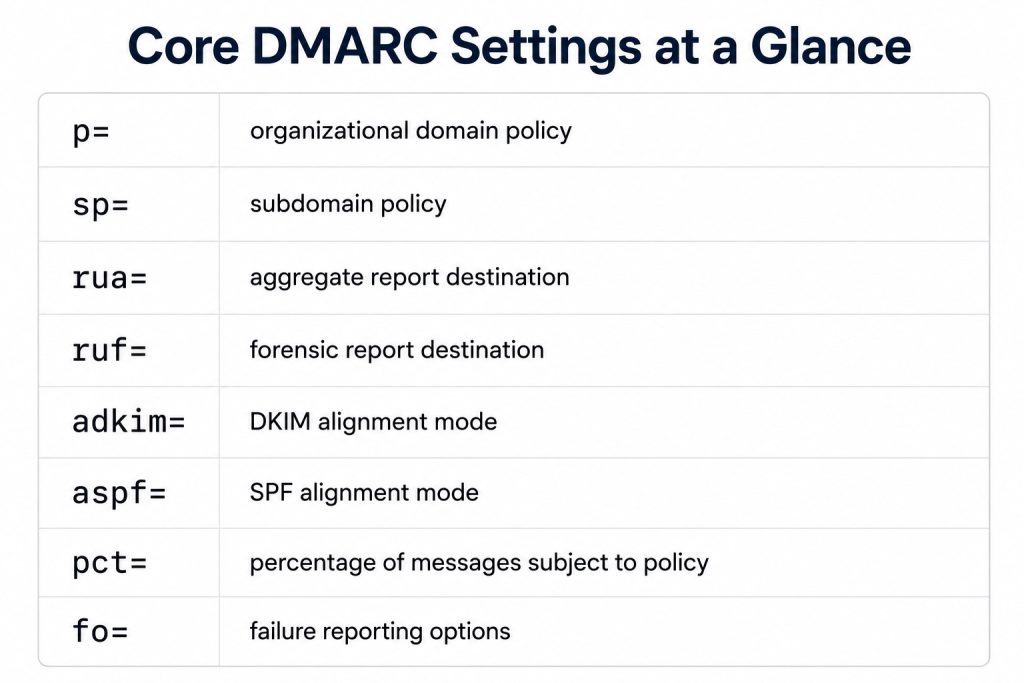
DMARC settings are a collection of tags published in a DMARC TXT record that define how receiving mail servers evaluate and process email messages associated with a domain. These tags govern policy enforcement, reporting behavior, alignment requirements, and subdomain handling during each message delivery attempt.
The core tags include:
- p= for organizational domain policy
- sp= for subdomain policy
- np= for non-existent subdomain policy
- rua= for aggregate reporting
- ruf= for forensic reporting
- adkim= for DKIM alignment mode
- aspf= for SPF alignment mode
- t= for testing mode behavior
Together, these tags determine how DMARC evaluation is performed and how authentication outcomes are communicated back to domain owners. Organizations implementing DMARC for the first time should understand how each tag affects message handling before moving into enforcement policies. For a broader breakdown of how DMARC works within email authentication, see this guide to DMARC.
The DMARC Policy Tag: p= Settings Explained
The p= tag defines the policy the domain owner requests receiving mail servers to apply when a message fails DMARC evaluation. This tag is the foundation of DMARC enforcement because it determines how failed messages are handled after SPF and DKIM checks are evaluated against the domain in the From header.
p=none
p=none instructs receiving mail servers that the domain owner is not requesting DMARC-based enforcement for messages that fail DMARC evaluation. Messages continue through the normal delivery process, while participating receivers can send aggregate report data to the reporting destination defined in the DMARC record.
This is the usual starting point for any new DMARC implementation because it provides visibility into legitimate and unauthorized sending sources without requesting DMARC-based enforcement. At this stage, organizations use aggregate reports to identify sending services observed using the domain and confirm whether SPF and DKIM alignment are configured correctly.
p=quarantine
p=quarantine requests that participating receiving mail servers treat failing messages as suspicious. Depending on the receiving platform, these messages may be routed to spam or junk folders instead of the primary inbox.
Organizations typically move to p=quarantine after reviewing aggregate report data and confirming that legitimate sending sources are consistently passing DMARC evaluation. This stage introduces enforcement while still allowing some flexibility for environments that may require additional remediation work.
p=reject
p=reject requests that participating receiving mail servers reject messages that fail DMARC evaluation, typically during the SMTP transaction. When a receiver honors the policy, messages that fail authentication and alignment checks are not accepted for delivery.
This policy stage is generally considered only after organizations have established sufficient reporting visibility and verified that all legitimate sending infrastructure is properly aligned. Before applying p=reject, teams should confirm that third party platforms, subdomains, forwarding workflows, and automated systems are consistently passing DMARC evaluation.
Recommended DMARC Settings for Each Stage of Implementation
DMARC policy progression should follow a staged implementation process driven by reporting visibility and alignment validation. Recommended configuration varies depending on whether the domain is in monitoring mode, partial enforcement, or full enforcement.
Recommended Settings for p=none
A monitoring-stage DMARC record should prioritize reporting visibility without affecting legitimate mail flow.
Recommended configuration:
- p=none
- rua=mailto:[email protected]
- t=n (default, full enforcement when policy advances)
- Relaxed alignment defaults for adkim= and aspf=
At this stage, the primary objective is identifying all legitimate sending sources and validating SPF and DKIM alignment behavior across the environment. Aggregate reporting through rua= is operationally necessary at this stage because it provides the visibility needed to investigate authentication failures before enforcement policies are introduced.
Recommended Settings for p=quarantine
The quarantine stage introduces enforcement while maintaining the same reporting structure used during monitoring.
Recommended configuration:
- p=quarantine
- rua=mailto:[email protected]
- t=n (default)
- Relaxed alignment unless stricter requirements have already been validated
Before applying quarantine policies, organizations should confirm that all approved sending services are properly authenticated and aligned. Aggregate report data should demonstrate consistent DMARC pass rates across business-critical mail streams. Note that the 2026 DMARC standard removed pct=, which was previously used to apply enforcement to a percentage of failing messages. Staged rollout now requires an operational approach: expanding enforcement progressively as alignment is validated across sending sources, rather than using a percentage knob in the record itself.
Recommended Settings for p=reject
Reject policies should only be considered after approved and observed legitimate sending sources consistently pass DMARC evaluation.
Recommended configuration:
- p=reject
- rua=mailto:[email protected]
- t=n (default)
- Alignment tags based on validated operational requirements
Even at the enforcement stage, ongoing reporting remains necessary. Aggregate reports continue to provide visibility into authentication failures, infrastructure changes, and newly observed sending sources that may require investigation.
If you are building or validating a DMARC record during implementation, you can build a correctly formatted record with the DMARC generator before publishing it to DNS.
How to Check DMARC Settings
There are two common methods for checking settings: querying the DNS TXT record directly or using a dedicated DMARC lookup tool.
Checking DMARC Settings Through DNS Queries
DMARC records are published as TXT records under the _dmarc subdomain of a domain. Administrators can retrieve the record using command-line tools such as dig or nslookup.
Example:
dig TXT _dmarc.example.com
A correctly formatted DMARC record will appear as a single TXT string similar to:
v=DMARC1; p=none; rua=mailto:[email protected];
When reviewing the record, administrators should confirm that:
- the syntax is correctly formatted
- required tags are present
- reporting addresses are valid
- policy values match the intended implementation stage
- alignment modes reflect operational requirements
Checking DMARC Settings With a Lookup Tool
Dedicated tools provide a faster way to validate published records and identify formatting or configuration issues. These tools typically parse the record automatically and surface invalid tags, syntax errors, or missing reporting tags that may affect DMARC evaluation.
In addition to validating the DMARC record itself, organizations should monitor reputation signals that can affect deliverability over time. EasyDMARC’s domain reputation monitoring helps teams review domain, IP address, and mail server blacklist status as part of broader authentication and deliverability governance.

The Subdomain Policy Setting: sp=
The sp= tag defines the DMARC policy applied specifically to subdomains associated with an organizational domain. This tag allows organizations to manage subdomain enforcement behavior independently from the primary domain policy defined by p=.
If the sp= tag is not explicitly configured, subdomains inherit the organizational domain policy by default. Under the 2026 DMARC standard, the organizational domain is determined through a DNS Tree Walk rather than the Public Suffix List, meaning the server walks up the DNS tree looking for published DMARC records. In practice this does not change day-to-day configuration, but it can affect which policy a subdomain resolves to in complex domain hierarchies.
For example, if the primary domain is configured with p=reject and sp= is omitted, subdomains will also be evaluated under a reject policy.
This inheritance behavior can create operational issues in environments where subdomains use different sending infrastructure, third party services, or legacy mail systems that have not yet been fully aligned for DMARC enforcement. Legitimate mail originating from those subdomains may fail DMARC evaluation if SPF or DKIM alignment has not been validated separately.
Example:
v=DMARC1; p=reject; sp=quarantine;
In this configuration:
- the organizational domain applies a reject policy
- subdomains apply a quarantine policy instead
Organizations managing multiple business units, regional infrastructures, marketing platforms, or application-specific subdomains should explicitly define sp= based on the intended enforcement strategy for those environments. Leaving subdomain policy behavior implicit can create a governance gap that is commonly overlooked in enterprise DMARC deployments.
The np= Tag: Non-Existent Subdomain Policy
The np= tag defines the DMARC policy applied to non-existent subdomains. This is distinct from sp=, which governs existing subdomains. If np= is not configured, the sp= value applies as a fallback, or p= if sp= is also absent.
This distinction matters because attackers can forge mail from subdomains that have never been published or used. A domain with p=reject and no np= configuration may still be vulnerable to spoofing through non-existent subdomains if sp= is set to a less restrictive policy. Organizations managing sensitive domains should explicitly define np= based on their intended enforcement posture.
What Changed in the 2026 DMARC Standard (RFCs 9989–9991)
In May 2026, the DMARC specification was updated through RFCs 9989, 9990, and 9991, replacing the original RFC 7489. Existing DMARC records remain valid and do not require immediate changes. There is no “DMARC2” and the v=DMARC1 identifier is unchanged.
The key tag-level changes are:
The pct=, rf=, and ri= tags were removed from the specification. The pct= tag was previously used to apply enforcement to a percentage of failing messages as a staged rollout mechanism. Its removal means staged enforcement now requires an operational approach rather than a configuration one.
The t= tag was introduced to replace the testing behavior previously associated with pct=0. Setting t=y signals that the domain is in test mode. The default t=n indicates full enforcement intent when a policy is active.
The np= tag was added to define policy behavior for non-existent subdomains, closing a gap that sp= did not address.
The method for determining the organizational domain changed from the Public Suffix List to a DNS Tree Walk, which affects how subdomain policy inheritance resolves in some environments.
Alignment Settings: adkim= and aspf=
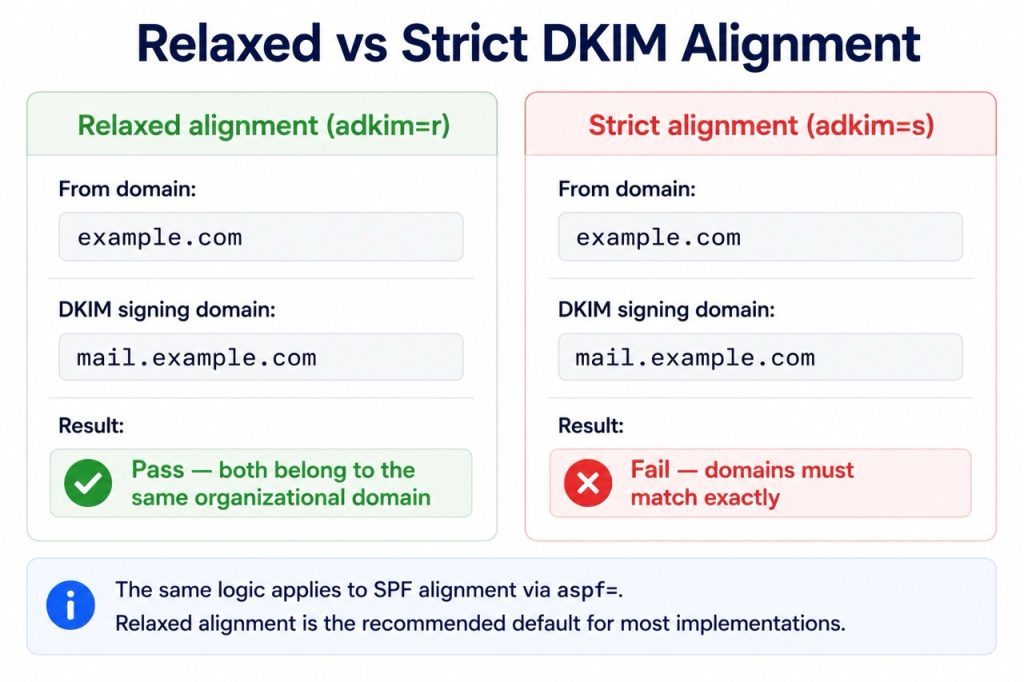
The adkim= and aspf= tags control how strictly DKIM and SPF identifiers must align with the domain shown in the message’s From header during DMARC evaluation.
Both modes are:
- relaxed alignment (r)
- strict alignment (s)
Relaxed Alignment
Relaxed alignment allows the authenticated domain to match the organizational domain of the From header, even when subdomains are involved.
Example:
- From domain: example.com
- DKIM signing domain: mail.example.com
Under relaxed alignment, this configuration passes because both domains belong to the same organizational domain.
Relaxed alignment is the default behavior for both SPF and DKIM and is recommended for most DMARC implementations. It provides operational flexibility for organizations using multiple sending platforms, delegated infrastructure, or subdomain-based mail services.
Strict Alignment
Strict alignment requires the authenticated domain to exactly match the domain used in the From header.
Example:
- From domain: example.com
- DKIM signing domain: mail.example.com
Under strict alignment, this configuration fails because the domains are not identical.
Strict alignment can introduce deliverability risk in environments where third party services or internal systems send mail through subdomains. Applying strict alignment without validating infrastructure behavior may cause legitimate mail to fail DMARC evaluation.
Strict alignment is uncommon in practice and should only be applied after confirming that all sending infrastructure signs with the exact organizational domain.
Choosing the Right Alignment Settings
Alignment configuration should be based on observed authentication behavior in aggregate report data rather than applied arbitrarily. Organizations should review which domains are being used for SPF authorization and DKIM signing across all legitimate sending services before changing alignment modes.
For most environments:
- adkim=r
- aspf=r
remain the recommended defaults throughout the monitoring and enforcement lifecycle.
How to Handle Exceptions in DMARC Settings
Legitimate sending sources sometimes fail DMARC evaluation because SPF authorization, DKIM signing, or domain alignment has not been configured correctly for that service. These exceptions are common in environments that rely on multiple third party platforms, cloud applications, marketing systems, or automated mail workflows.
DMARC exceptions are not handled by creating exclusions inside the DMARC record itself. Instead, remediation requires correcting the underlying SPF or DKIM configuration associated with the failing sender.
The process typically follows several steps:
- Identify the failing source through aggregate DMARC report data.
- Determine whether the service requires SPF authorization, DKIM signing, or both.
- Verify whether the authenticated domain aligns with the domain used in the From header.
- Update the sending service configuration and validate that messages are passing DMARC evaluation before tightening enforcement policies.
For example, a marketing automation platform may send mail using a DKIM signing domain that does not align with the organizational From domain. In that case, the issue is resolved by updating the DKIM configuration or enabling custom domain signing within the platform, not by modifying the DMARC policy behavior.
EasyDMARC surfaces failing sources identified in aggregate reports, allowing teams to investigate and resolve alignment issues before tightening enforcement. In environments that manage authentication workflows programmatically across multiple platforms or services, organizations should also follow established best practices for API integration with DMARC to maintain consistent authentication management and reporting visibility as infrastructure changes over time.

The Reporting Tags: rua= and ruf=
The rua= and ruf= tags define where DMARC reporting data is sent, but they serve different operational purposes and should not be treated interchangeably.
rua=: Aggregate Reporting
The rua= tag specifies the destination for aggregate DMARC reports. These reports are typically generated daily by participating receiving mail servers and contain summarized authentication data for messages associated with the domain.
Aggregate reports provide visibility into:
- sending sources observed using the domain
- SPF and DKIM pass or fail results
- alignment outcomes
- message volume patterns
- policy evaluation behavior
Example:
v=DMARC1; p=none; rua=mailto:[email protected];
The reporting address defined in rua= should point to a destination capable of processing aggregate XML data at scale. Because DMARC aggregate reports are highly structured and can become large in enterprise environments, organizations commonly use specialized platforms to parse, normalize, and analyze the reporting data.
rua= should remain enabled throughout the entire DMARC lifecycle, including monitoring, quarantine, and reject stages.
ruf=: Forensic Reporting
The ruf= tag specifies the destination for forensic failure reports. Unlike aggregate reports, forensic reports contain message-level failure information associated with individual authentication failures.
Example:
v=DMARC1; p=quarantine; ruf=mailto:[email protected];
Forensic reporting is optional and less commonly implemented in production environments. Many organizations choose not to enable ruf= because forensic reports may contain message content or metadata that introduces privacy, compliance, or data handling considerations, depending on the jurisdiction and receiving provider behavior. When ruf= is enabled, receiving servers generate reports based on the failure conditions defined during onboarding or platform configuration.
Not all receiving mail servers generate forensic reports, even when ruf= is configured. As a result, aggregate reporting through rua= remains the primary source of operational visibility for most DMARC implementations.

Moving From Monitoring to Full Enforcement: A Settings Progression
DMARC enforcement readiness depends on sustained reporting visibility rather than a fixed timeline. Organizations should advance policy only when aggregate data demonstrates stable authentication performance across all legitimate sending infrastructure, including third-party services, subdomains, and automated workflows. Because the 2026 spec removed pct=, enforcement progression is now entirely operationally driven. Teams reviewing vendors or implementation support models can use our guide on how to choose a reliable email authentication service provider to assess reporting, monitoring, and enforcement capabilities in larger environments.
Frequently Asked Questions
Start with p=none and a valid rua= address for aggregate reporting. Leave adkim= and aspf= at relaxed defaults unless strict alignment is operationally required. The 2026 DMARC standard removed pct=, so staged rollout is now handled operationally through alignment validation and source discovery. The t= tag replaces testing-mode behavior: t=n is the default and signals full enforcement intent when a policy is active.
Query the DNS TXT record at _dmarc.yourdomain.com using dig or nslookup, or use a dedicated DMARC lookup tool. The record should contain v=DMARC1, a valid p= tag, and an active rua= address. Lookup tools validate syntax, surface configuration errors, and identify missing tags that may affect evaluation or enforcement.
p=none tells receiving mail servers to evaluate messages without applying enforcement actions. Messages continue through normal delivery while aggregate reports are generated for the domain owner. It is the appropriate starting point for most new implementations and for organizations still validating authentication coverage across their sending infrastructure.
Review aggregate report data to identify whether the failure is related to SPF authorization, DKIM signing, or domain alignment. DMARC does not support sender-specific exceptions inside the record itself. The underlying authentication configuration for the affected service must be corrected, whether that means updating SPF, enabling DKIM signing, or configuring custom domain alignment. Validate that the sender consistently passes DMARC evaluation before advancing enforcement.

 We’re glad you joined EasyDMARC newsletter! Get ready for valuable email security knowledge every week.
 You’re already subscribed to EasyDMARC newsletter. Continue learning more about email security with us