
Most BigCommerce store owners put time and effort into optimizing product pages, checkout flows, ad campaigns, etc., hardly giving any thought to whether the emails are actually being ‘delivered’ to the recipients’ primary inboxes. Order confirmations, shipping updates, abandoned-cart reminders, and password resets are all sent automatically, and most people assume they’ll land in the customer’s inbox by default.
However, the truth is a bit different and technical.
Inbox providers now treat unauthenticated emails with suspicion, especially those from e-commerce brands. So, if your domain lacks BigCommerce SPF and DKIM records, your emails may still be “sent” from BigCommerce, but they’re far more likely to be filtered, delayed, or ignored entirely by receiving servers.
This guide covers setting up SPF and DKIM for BigCommerce. But first, it’s important to understand why your domain requires email authentication.
Why BigCommerce Stores Need SPF and DKIM?
Here’s why BigCommerce SPF and BigCommerce DKIM are no longer optional in 2026.
Inbox Providers No Longer Trust Unauthenticated Emails
Email providers like Gmail, Outlook, and Yahoo now heavily rely on authentication to decide whether an email deserves to reach the inbox. If your store doesn’t have a valid BigCommerce SPF record or DKIM signature, your emails are automatically treated as “high risk.” This directly affects order confirmations, password reset emails, shipping updates, and marketing campaigns.
E-commerce Brands Are Prime Targets for Spoofing
BigCommerce stores are especially attractive to attackers because they send high-value transactional emails that customers already expect and trust. If your domain lacks SPF and DKIM, it becomes easy for someone else to impersonate your brand and send phishing emails that look completely legitimate. Attackers commonly use this to send fake refund or invoice emails, share malicious payment links, or impersonate your support or billing team.
The real danger is that customers usually can’t tell the difference. If an email looks like it came from your store, they’re far more likely to click without thinking twice.
Revenue Depends on Email Deliverability
For most BigCommerce stores, a significant portion of revenue is driven by automated emails, such as abandoned-cart reminders, promotions, and post-purchase flows. These messages are meant to reach customers at high-intent moments.
If those emails don’t land in the inbox, they simply don’t perform. When SPF and DKIM are missing or misconfigured, inbox providers treat your emails as less trustworthy, increasing the chances of them being filtered, delayed, or sent to spam.
The Process of Configuring SPF
- Access your DNS management dashboard.
- Under ‘Tools & Settings’, choose ‘DNS Template’.
- Modify the DNS TXT record related to SPF.
For BigCommerce, the syntax of the SPF TXT record is: mydomain.com TXT v=spf1 include:_spf.bigcommerce.com -all
You should add this record to the DNS records section of the appropriate domain.
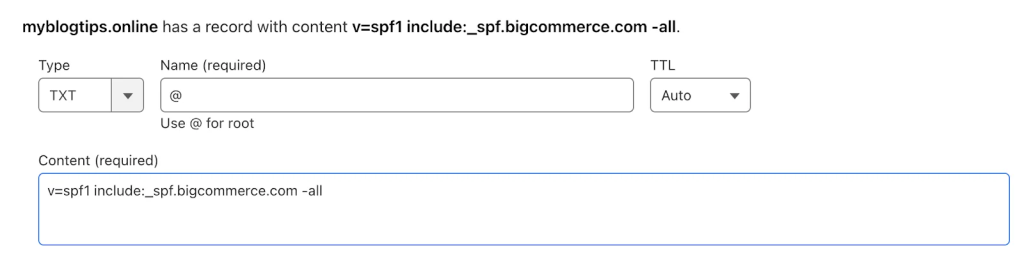
If you are already using a third party’s SPF record, you need to include the new one.
Example: v=spf1 include:example.com include:_spf.bigcommerce.com -all
Important Note: Each domain must have only one SPF TXT Record. If you have multiple SPF Records, SPF will return a PermError.
Lastly, save the adjustment and give your DNS up to 72 hours to reflect the changes.
How to Verify SPF for BigCommerce?
Setting up SPF is not a one-time task. You also need to check from time to time whether it’s actually working, especially after switching email tools, updating DNS, or adding new sending services. The easiest way to do this is by using online lookup tools that read your domain’s DNS records and show whether authentication is correctly set up.
For SPF, you can use the EasyDMARC SPF Lookup tool. Just enter your domain name, and it will tell you:
- Which servers are allowed to send emails
- Whether your SPF record has any errors
- If your record is too long or close to technical limits
This helps you quickly spot missing services or broken configurations that could affect delivery.
Common SPF Issues in BigCommerce
At times, despite being careful, small mistakes can quietly disrupt email delivery. Here are some common SPF issues encountered in BigCommerce and how to fix them.
Existence of Multiple SPF Records
One of the most frequent mistakes is having more than one SPF record for the same domain. This usually happens when different tools or developers add their own records separately.
Inbox providers only read one SPF record per domain. If multiple records exist, SPF fails automatically, even if all information is correct.
To fix it, merge everything into a single record. All sending services should be listed under a single v=spf1 entry rather than spread across multiple records.
Missing Email Services
Many BigCommerce stores use third-party tools, such as marketing platforms, CRMs, or support systems, to send emails. If these services are not included in SPF, their emails will fail authentication. This often happens after adding a new tool and forgetting to update the DNS.
So, fix it by listing all platforms that send emails on your behalf, and ensure each is included in your SPF record using include or IP mechanisms.
Exceeding the 10 DNS Lookup Limit
SPF allows a maximum of 10 DNS lookups. Large BigCommerce setups with multiple tools often cross this limit without realizing it, especially when several platforms are chained together using include statements.
When this happens, inbox providers stop checking and treat SPF as a failure, even if all sending services are technically valid. You can resolve this BigCommerce SPF record misconfiguration using an SPF flattener that replaces multiple ‘include’ statements with direct IP addresses. This reduces DNS lookups and keeps your record within technical limits while maintaining proper authorization.
Setting up DKIM
At the moment, BigCommerce doesn’t directly support DKIM signing. Nevertheless, BigCommerce allows you to route your emails through a DKIM-enabled system, allowing you to authenticate them with DKIM keys. For more specifics on this process, please reach out to the BigCommerce support team.
Important Note: If the provider recommends publishing a DMARC record, there’s no need to do so if you already have a DMARC record in place, as each domain can only have one DMARC record.
Wrapping Up: Make Your BigCommerce Emails Trusted
SPF and DKIM are no longer “nice to have” for BigCommerce stores; they are basic requirements for email trust. A properly configured SPF record ensures only authorized senders are allowed to send email from your domain. DKIM adds an extra layer of trust by confirming that your emails are real and haven’t been changed in transit.
So, try EasyDMARC to monitor, verify, and strengthen your email authentication setup and help your emails reach the inbox, protect your brand from being impersonated, and keep customer communication consistent and reliable.
Frequently Asked Questions
Does BigCommerce Provide Built In SPF and DKIM?
BigCommerce provides basic SPF support, but it does not offer full DKIM signing by default. Most stores need third-party email services to properly authenticate emails.
Can I Use Third-Party Email Services With BigCommerce?
Yes, you can use services like marketing or support tools with BigCommerce. You just need to add their SPF and DKIM records to your domain. While you do so, make sure you don’t exceed the DNS lookup limit of 10.
What Happens If BigCommerce SPF or DKIM Is Not Set Up?
Your emails may go to spam or fail completely. Customers might not receive important messages, such as order updates or password resets. This can hamper delivery and customer support, ultimately tarnishing your brand image.
How Long Does SPF and DKIM Changes Take to Apply?
SPF and DKIM changes usually take a few minutes to a few hours. In some cases, DNS updates can take up to 48 hours. During this time, email delivery may remain inconsistent.

 We’re glad you joined EasyDMARC newsletter! Get ready for valuable email security knowledge every week.
 You’re already subscribed to EasyDMARC newsletter. Continue learning more about email security with us